Your First .NET 8 Service on Kubernetes
The Mesh Series · Article 3
Article 3 · A series on Kubernetes, Istio, C#/.NET, and Microsoft Entra ID — for architects who have to make this work, and then defend it in an audit.
You have the mental model now. Article 2 gave you a .NET 8 minimal API and the Deployment plus Service YAML that fronts it. Both sit on your disk, doing nothing. A YAML file is not a running service. A cluster does not care about your intentions.
So ship it. Containerize the API, push it to a registry, apply the manifests, and watch Kubernetes roll it out live. Four commands. The interesting part is what happens between them, and what breaks when it goes wrong — because the first three times you do this, something will.
Why this step is where audits start, not end
A regulator does not audit your source code. They audit what runs. The gap between "it worked on my machine" and "here is the image that has been serving production traffic for ninety days, and here is who built it" is the demo-to-audit gap, and it opens the moment you containerize.
For a BFSI institution in India or the Middle East, that gap has a name and a clock. CERT-In gives you six hours to report an incident and expects 180 days of logs held in-country. SAMA's CSF is a maturity model — it does not ask whether you have a control, it asks you to prove the control runs continuously. When an assessor asks "what is in that container, and can you prove it hasn't changed," :latest is not an answer. It is a finding.
Three habits, established now, cost you nothing and save you the audit conversation later: run as non-root, pin the image tag, push to a private registry. None of these are advanced. All of them are things an auditor checks first.
How the pieces fit
The flow is linear. Your source becomes an image. The image lands in a registry the cluster can reach. Kubernetes pulls it, starts pods, and — this is the part people skip — waits for each pod to say it's ready before sending it traffic.
That readiness gate is the whole reason a rolling update doesn't drop requests. Kubernetes brings up a new pod, holds traffic until the readiness probe passes, then retires an old one. No probe, no gate: the platform assumes a running process is a ready process, starts routing immediately, and your users eat the cold-start errors while the runtime is still warming up. The probe you defined in Article 2 is not decoration. It is the difference between a deploy and an outage.
Show the code
Two artifacts do the work. First, the Dockerfile — and the point here is the shape of it, not the syntax.
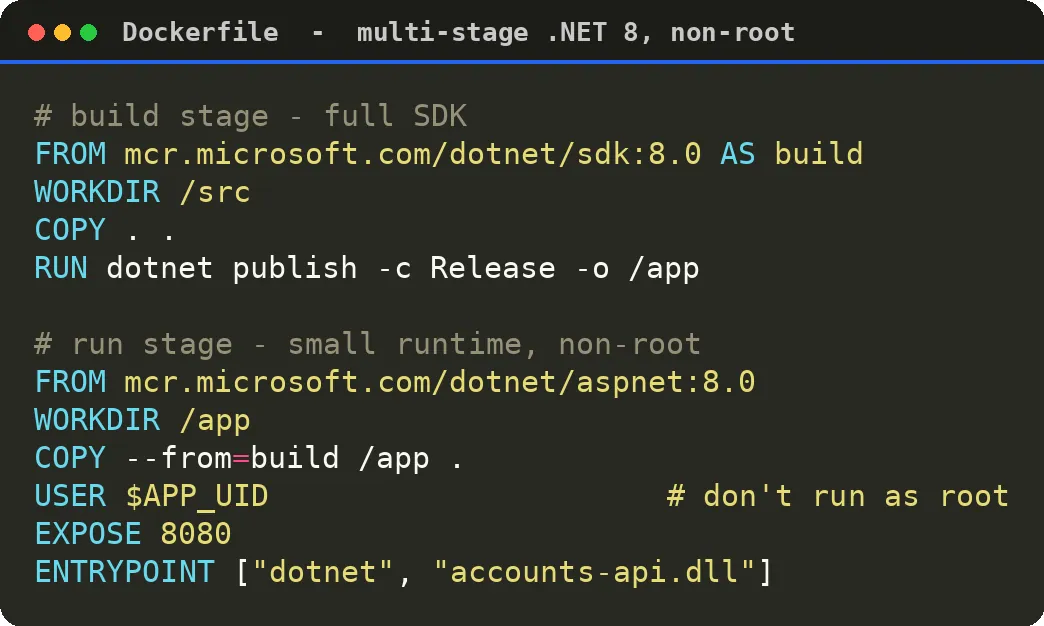
Two stages. The first pulls the full .NET SDK — compilers, restore, the lot — and produces a published build. The second throws all of that away and copies only the output onto the smaller aspnet runtime image. You ship the runtime, not the toolchain. The SDK image is large and carries build-time tooling an attacker would love to find on a running container; none of it reaches production.
The line that matters most is USER $APP_UID. The .NET 8 base images define that variable specifically so you can drop to a non-root user without inventing a UID yourself. Skip it and your container runs as root — which means a container breakout runs as root too. For a workload touching payment or customer data, "the process ran as root" is a control gap you will have to explain in writing. One line closes it.
Now build the image, push it, and deploy.
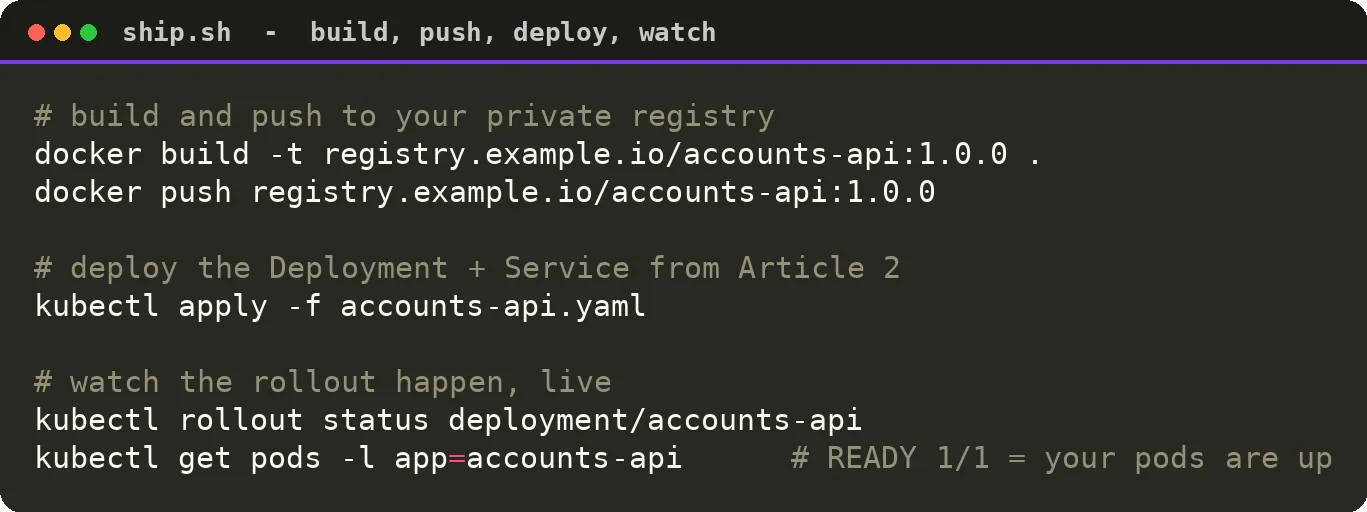
Note the tag: 1.0.0, not latest. A pinned tag is an immutable fact — that string points to exactly one image, forever. latest points to whatever was pushed last, which means two clusters running "latest" can be running different code, and neither you nor your auditor can tell. Pin it, and provenance becomes a lookup instead of an argument.
kubectl rollout status is the command that turns a deploy from a leap of faith into something you watch. It blocks and streams progress until every replica is updated and ready, or until it gives up. When it returns success, the new version is genuinely serving. When it hangs, you have a problem — and the problem has a name.
ImagePullBackOff means Kubernetes cannot get your image. Ninety percent of the time it is one of two things: the tag is wrong — a typo, or you pushed 1.0.0 and referenced 1.0.1 — or the cluster cannot authenticate to your private registry because you never gave it an image-pull secret. The app is fine. The cluster never got far enough to run it.
CrashLoopBackOff is the opposite: the image pulled, the container started, and your application died on boot. A missing connection string, a config value that isn't there, a failed migration on startup. Kubernetes restarts it, it dies again, and the platform backs off with longer and longer delays so a broken app doesn't spin your node at full tilt. This one is never Kubernetes. It is always your code or your config. kubectl logs the pod and it will usually tell you exactly what it couldn't find.
Learn to read those two statuses on sight. They are the entire vocabulary of your first bad deploy.
Security · Audit · Integration
Pick this instead when…
The Dockerfile above is the standard because it works everywhere and hides nothing. But it is not the only path.
dotnet publish -p:PublishProfile=DefaultContainer — the .NET SDK builds an OCI image with no Dockerfile at all, and it defaults to non-root sensibly. Pick this when your base image is stock Microsoft and you want one less file to maintain. Skip it when you need a custom base — a hardened distro, an internal golden image your security team mandates — because then you're back to a Dockerfile anyway.Buildpacks (Paketo, pack) — auto-detects .NET and produces a reproducible, rebuildable image with a documented layer structure. Pick this when you run many services and want a uniform, centrally-patched build contract across teams. Skip it when you want to see and control exactly what goes in the image; the abstraction that helps at scale hides things you may need to defend..NET Aspire — for wiring up your service with its Postgres, Redis, and dependencies on your laptop. Pick this when the pain is local orchestration, not deployment. It is a dev-loop tool, not your production packaging story — don't confuse the two.ACR vs Docker Hub for the registry — if you're on Azure and running AKS, Azure Container Registry with managed-identity pull removes the image-pull-secret dance entirely and keeps images in-region, which matters for RBI and SAMA data-residency posture. Pick Docker Hub when you're prototyping and residency is not yet on the table; migrate before it is.
From simple to standard
The simple version of today is four commands and a running pod. The standard version is the same four commands with three non-negotiables baked in from the first build: non-root, a pinned tag, a private registry. You did not add work. You added the three things an auditor checks before they check anything else, and you added them while the cost was one line and one habit rather than a remediation project.
Your service is now a pod with a stable identity, reachable at a Service address, rolling out without dropping traffic. It is also completely on its own — every service still doing its own auth, its own retries, its own TLS, each one a small distributed monolith held together with auth tokens and prayer.
That is the problem a service mesh claims to solve. In Article 4 — What a service mesh actually does (and what it doesn't) — we separate the claim from the reality before you put Istio anywhere near production.
Key skills & topics in this article
Also on LinkedIn.