The Mesh Series · Article 12 · Where Entra meets Istio
Article 6 left a line worth reviving: an unverified token is just a string. Article 11 had the gateway check it at the edge. This article is the uncomfortable follow-up — your service has to check it too, and check it properly, because a half-verified token is worse than an unverified one. An unverified string you'd never trust. A token that passed some of the checks looks trusted, gets waved through, and carries an authority it never actually earned.
Validation isn't one yes/no. It's a pipeline of independent gates, and a claim inside the token is only worth acting on after all of them pass.
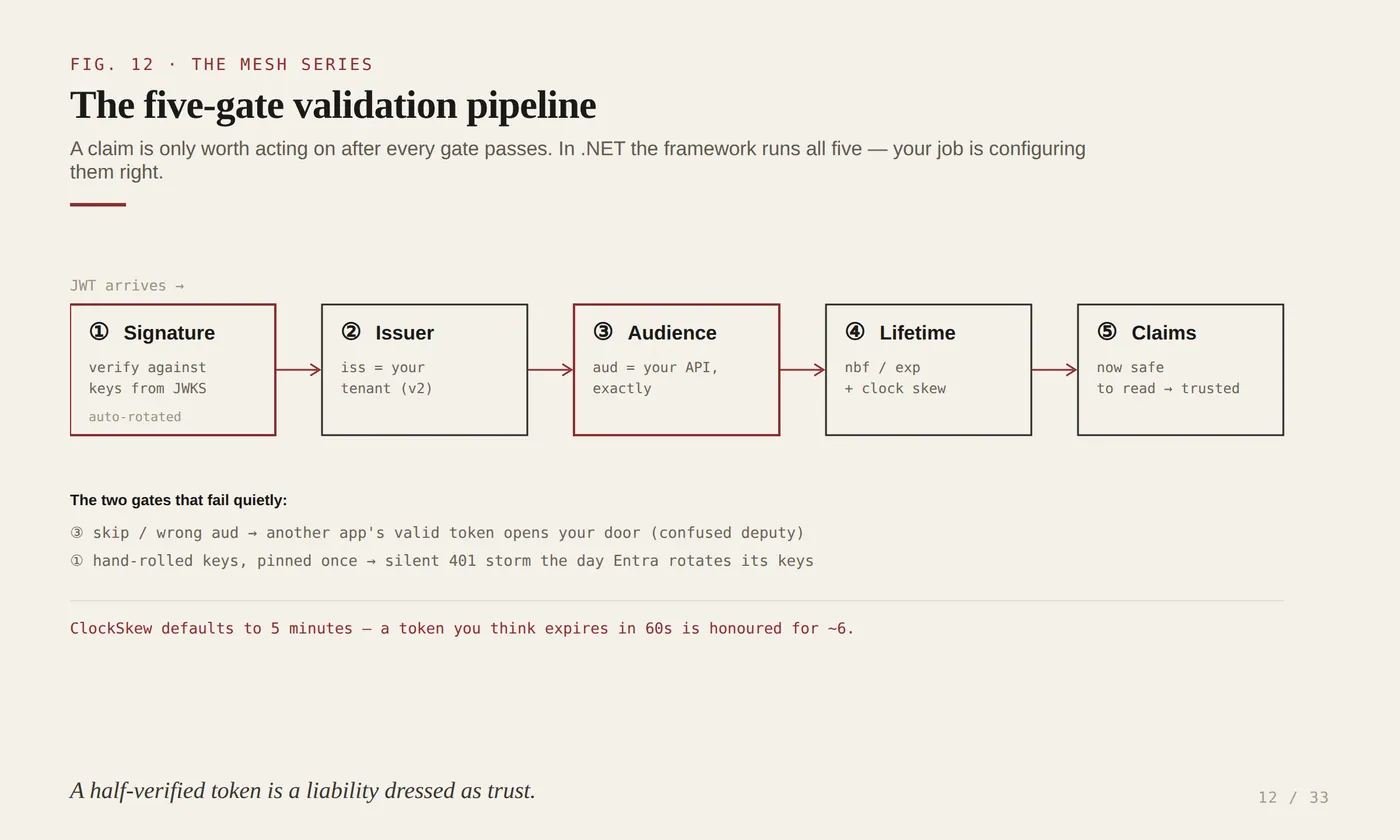
Five gates. Skip any one and you haven't "mostly validated" — you've built a door with a lock that doesn't engage. The good news: in .NET you do not write this pipeline. You configure it, and the framework runs all five by default. The skill is configuring it correctly — and knowing what each gate is actually protecting you from.
Why regulated enterprises should care
Two of these gates fail quietly and expensively, so make them concrete.
Audience is the confused-deputy gate. The aud claim says which API this token was minted for. Skip audience validation — or set it to the wrong value — and your payments service will cheerfully accept a token that Entra issued for a completely different application. The caller authenticated as a real user, to a real Entra app, and got a real, signed, unexpired token… for some other service. Your service treats it as its own. That's not a theoretical CVE; it's a one-line misconfiguration that turns any valid token in the tenant into a key to your door.
Signature is the key-rotation gate, and it's the one people break trying to be clever. Entra rotates its signing keys on its own schedule. The correct setup fetches the current public keys from Entra's JWKS endpoint and refreshes them automatically. The tempting shortcut — copy a "decode this JWT" snippet, pin one signing key, cache it forever — is a time bomb with the fuse set to Microsoft's rotation calendar. It works in the demo, works for weeks, then every token starts failing signature validation the day Entra rotates, at 3 a.m., with no code change on your side to explain it. Worse is the "fix" a tired engineer reaches for: disable signature validation to stop the pages. Now anyone can forge a token.
For a regulated institution the stakes aren't just uptime. Under CERT-In's incident regime or a SAMA maturity assessment, "the service independently verified the caller" has to be true, not "the gateway probably did it upstream." A service that trusts the edge blindly has no answer when the edge is bypassed — an internal call, a misrouted ingress, a future refactor. Independent validation in the service is the difference between a control you can attest to and a story you hope holds.
How the pieces come together
Article 11 validated the token coarsely at the mesh edge — enough to reject the anonymous and the obviously-bad. This article validates it again, deeply, inside the service, and that duplication is deliberate: it's the defense-in-depth the next article argues for. The edge and the service are two independent gates on the same token, and neither trusts the other to have done the job.
The engine is Microsoft.Identity.Web sitting on top of the ASP.NET Core JWT bearer handler. It wires the five-gate pipeline with the right Entra v2 defaults, and — the part that matters most — it manages the JWKS key material for you, refreshing it as Entra rotates. You supply four facts (which cloud, which tenant, which audience) and it supplies the machinery. The manual path exists; you almost never want it.
Show the code
The correct, minimal setup is three lines of wiring and a short config block. Microsoft.Identity.Web 4.14.2 on .NET 8:
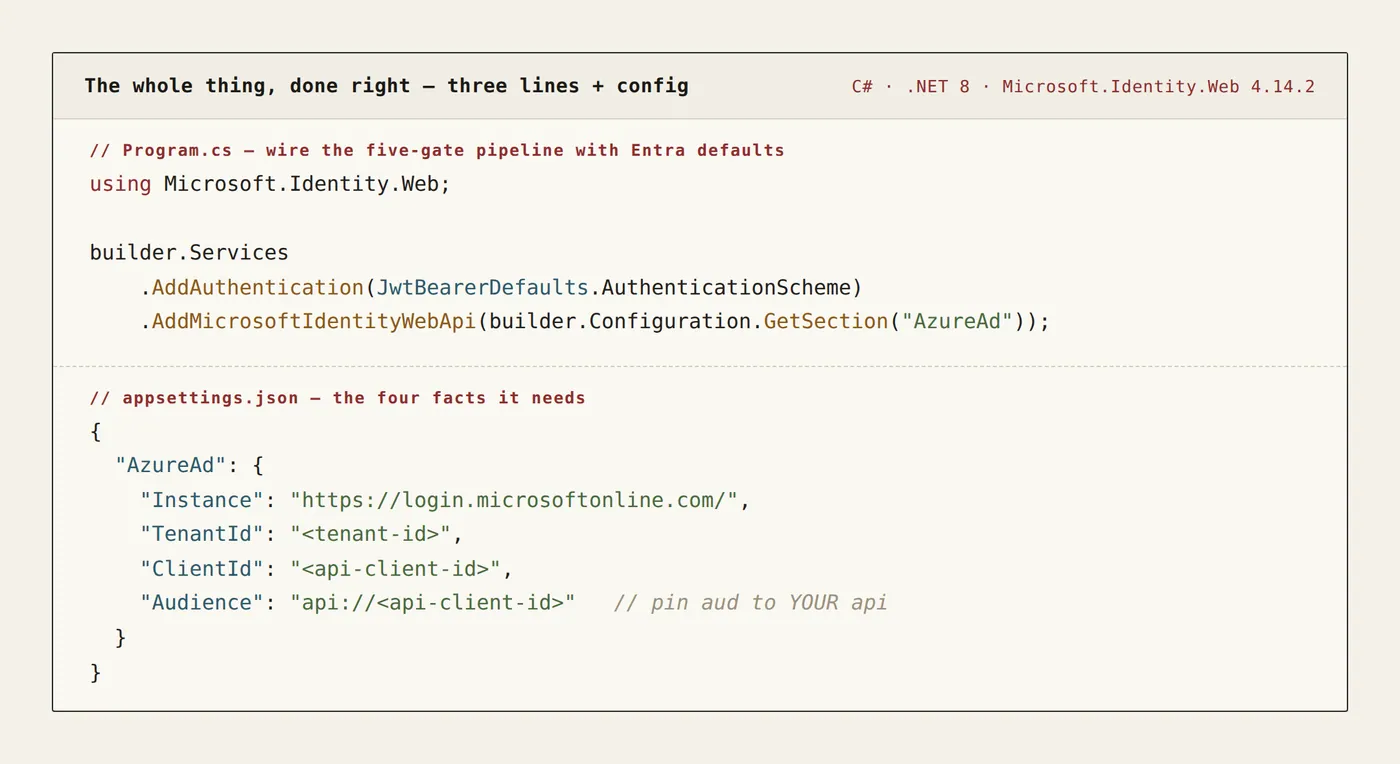
That's the whole thing, done right: issuer derived from tenant, audience pinned to your API's App ID URI, signature keys fetched and auto-rotated, lifetime enforced. Nothing hand-rolled.
It helps to see what those three lines expand into, because that's the pipeline you'd otherwise get wrong by hand. Every Validate* flag defaults to true — your job is supplying the values, not enabling the checks:
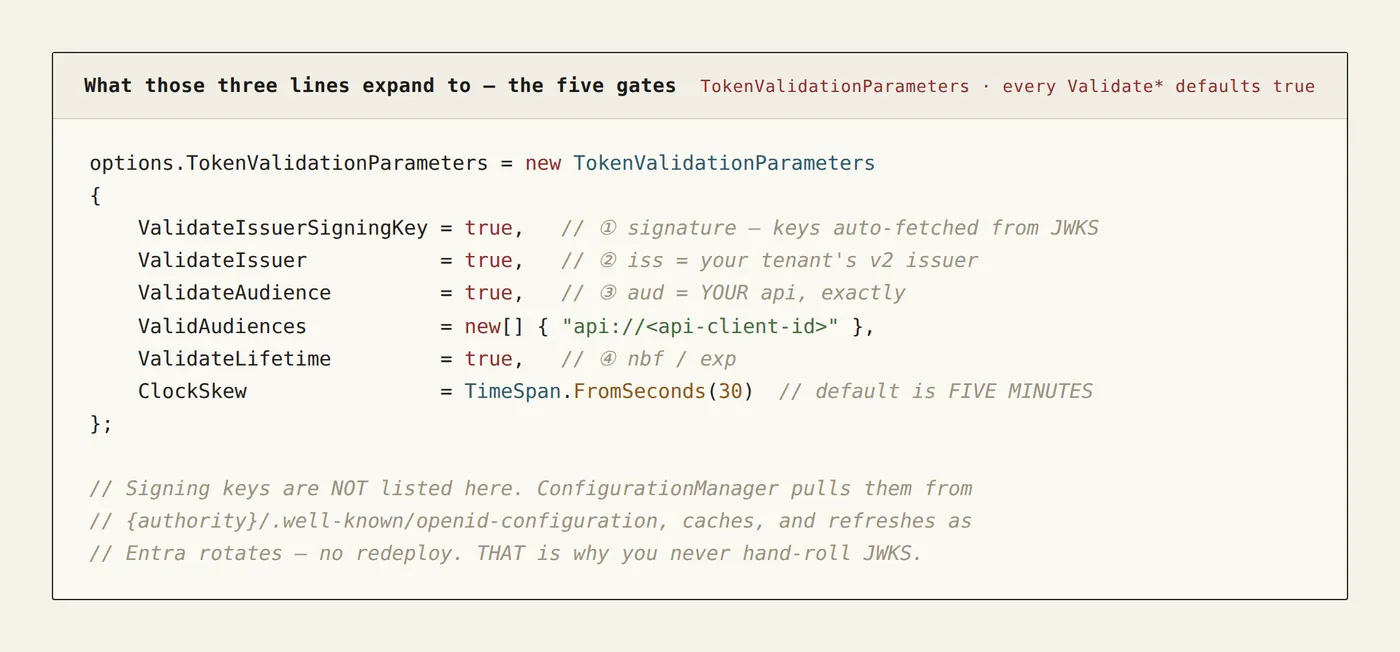
Two things in that block earn their comments. The signing keys are not listed — the framework's ConfigurationManager pulls them from {authority}/.well-known/openid-configuration, caches them, and refreshes on Entra's rotation without a redeploy. That single behaviour is the entire reason not to hand-roll JWKS. And ClockSkew defaults to five minutes — so a token you think expires in sixty seconds is honoured for roughly six. If you issue short-lived tokens for a reason, that reason is being quietly overridden; tighten it deliberately.
Once the pipeline passes, the claims are finally safe to read — the user, the roles, the tenant:
[Authorize] [HttpPost("/ledger")]public IActionResult Post() { var user = User.FindFirst("oid")?.Value; // stable user object id // deep per-claim authz is Article 18 — here the token is simply TRUSTED return Ok($"validated caller: {user}");}One debugging note that saves hours: validation failures come back as Microsoft IdentityModel IDX codes, and they're specific. IDX10214 is an audience mismatch — you pinned the wrong aud. IDX10205 is an issuer mismatch — v1-versus-v2 issuer, usually. IDX10223 is expiry — check exp and your ClockSkew. IDX10500/IDX10503 is signature — a stale key cache mid-rotation. Wire JwtBearerEvents.OnAuthenticationFailed to log the code and you stop guessing.
That's the tidy case. The nastiest failure — key rotation — often isn't tidy. When the thing that broke is the JWKS fetch itself, what lands in your logs may be a generic authentication error or a bare network exception, not a clean IDX10500, because the failure was never the signature check — it was retrieving the keys to check against. You end up reading a network stack trace with no mention of "signature," inferring rotation from the timing rather than the log line. So log the raw exception, not just the friendly message — and treat "auth started failing across the board, no deploy to blame" as a key-material problem until proven otherwise. That single reflex turns a multi-hour outage into a ten-minute one.
Security · Audit · Integration
Security property gained. The service trusts a claim only after signature, issuer, audience, and lifetime have each independently passed — so a token forged, replayed from another provider, minted for a different app, or expired is rejected in the service itself, not merely upstream. The confused-deputy and forged-token classes are closed at the point that actually touches the data.
Audit evidence produced. You can show the auditor that every request is validated in-code against a pinned audience and the tenant's live signing keys, independent of any edge control — with IDX rejections logged. "The service verifies the caller itself" becomes a demonstrable fact, which is exactly what CERT-In and SAMA reward over "we assume the gateway did."
How it integrates. This is the in-code half of a two-gate design: the mesh edge (Article 11) and the service (here) validate the same token independently. Why both, and where the responsibility sits when they disagree, is Article 13 — defense in depth. Fine-grained authorization on the claims you just made safe to read is Article 18.
Alternatives, and when you'd actually pick them
Microsoft.Identity.Web is the default for Entra-issued tokens in .NET. The variations trade convenience for control.
Raw AddJwtBearer, no Microsoft.Identity.Web. Perfectly legitimate — you set Authority and Audience yourself and still get the auto-refreshing ConfigurationManager and the five-gate defaults, because that machinery lives in the underlying handler, not the wrapper. Reach for it when you want fewer dependencies or a non-Entra OIDC provider; accept that you're now hand-writing the Entra-specific defaults (issuer format, api:// audiences) that the wrapper knew.
Hand-rolled JWKS / manual signature checks. Almost never. The only defensible cases are education, an air-gapped environment with no path to the metadata endpoint, or an exotic token format nothing supports. Outside those, you are volunteering to reimplement key rotation — and the failure mode isn't a compile error, it's a silent outage on Entra's schedule or, worse, a validation you quietly turned off. If you find yourself pinning a signing key, stop.
Validate only at the edge (Article 11), not in code. The single-gate shortcut. Cheaper, and genuinely fine for a low-stakes internal service behind a trusted gateway. For anything touching regulated data, it fails the "the service verified the caller itself" test the moment the edge is bypassed. That's the whole argument of the next article.
From the toy to the standard
The toy is AddMicrosoftIdentityWebApi and a four-line config. The industry-standard version is the same pipeline everywhere it matters: every service validates independently, audience pinned to its own App ID URI so no other app's token fits, issuer pinned to the tenant, signing keys fetched live and rotated automatically, clock skew set to a number you chose rather than the five-minute default you inherited, and IDX failures logged so a rejection is a diagnosis, not a mystery. No hand-rolled crypto, no disabled flag, no blind trust in the edge.
Which raises the obvious question the whole article has been circling. If the gateway already validated this token, and now the service validates it again — isn't that redundant? It isn't, and the reason is the entire point of the next piece.
That's Article 13: defense in depth — validate at the mesh and in the code, and know which one you'd keep if you could only have one.
Next in the series — Article 13: Defense in depth.
Key skills & topics in this article
Also on LinkedIn.